How to use regulatorlookup.org in due diligence
How to use regulatorlookup.org in due diligence: Regulatorlookup.org helps you do the first pass of due diligence by checking whether a company record…
How to use regulatorlookup.org in due diligence
Last updated: November 16, 2026
Quick answer: use regulatorlookup.org as a 1-step screening check in due diligence, not as the final word. In this guide to how to use regulatorlookup.org in due diligence, the site helps you confirm that a company record exists, review status details, and keep cleaner notes before you move to official documents and deeper checks. If the decision has legal, regulatory, or financial consequences, consult a qualified professional and confirm the result against the source file.
Key takeaways
- Start with the exact legal name, not a nickname or brand name.
- Treat the record as one input in a due diligence checklist, not the whole file; if the result affects a legal or regulatory judgment, consult a qualified professional and verify the source document.
- Save what you saw, when you saw it, and which record details matched.
- Watch for stale status, missing identifiers, or names that do not line up.
- If the record raises a red flag, stop and confirm against the source document before you proceed.
What role does regulatorlookup.org play in due diligence?
Regulatorlookup.org helps you do the first pass of due diligence by checking whether a company record lines up with what you already have. It is useful when you need a quick screen before you spend time on contracts, filings, or a longer review.
That matters because due diligence is not one action. It is a chain of small checks: name, status, record details, and documentation notes. A single site can help with that chain, but it should not be treated like a final approval stamp; if the outcome matters for a legal or regulatory decision, consult a professional and verify the underlying source. For a broader check, it sits inside the larger “using regulatorlookup.org for verification” process, not above it.
A generic article often gets this wrong by treating any lookup result as proof that a firm is safe, licensed, or current. That is too much to ask from one record screen, so consult a qualified professional when the result affects a compliance or legal judgment. The better use is narrower: confirm the record, note the status, and decide whether the file needs another source before you move on. For general screening discipline, the SEC’s investor resources at Investor.gov show why a record check is only one part of a review.
This approach is most useful when you are reviewing one company at a time. It is less useful if you need a full compliance opinion, a legal view, or a decision that depends on original filings from a regulator or a company secretary. In those cases, the lookup is a starting point, not the end of the job.
How do you run a due diligence check on regulatorlookup.org?
You run a due diligence check on regulatorlookup.org by matching the record to the company, saving the details, and marking any mismatch before you move to the next step. The process is simple, but the order matters.
-
Enter the exact company name from your file. Use the legal name, not a trading name or a shortened label. A close-but-wrong name can point you to the wrong record and waste 10 minutes or more.
-
Check the record heading first. Confirm the spelling, the entity name, and any obvious identifier shown on the page. If the heading does not match the document in front of you, stop and recheck the input.
-
Read the status line before anything else. Look for whether the record appears current, inactive, suspended, or otherwise marked. That single line often tells you whether the file needs more attention right away.
-
Compare the record details with your checklist. Match the company record against your internal notes, contract draft, or onboarding form. Look for address, registration wording, and any date or reference field that appears on screen.
-
Save a note of what you found. Write down the date, the exact name searched, the status shown, and any mismatch. A 2-line note can save a 2-hour cleanup later.
-
Flag anything that does not line up. If one field is off, mark it for follow-up instead of forcing a fit. A mismatch is useful because it tells you where to look next.
-
Move the file forward only after the record makes sense. If the record is clear and matches the rest of the file, you can keep going. If it does not, hold the decision until you have more support.
The point of the process is not speed alone. It is a clean trail. A due diligence checklist works best when every step leaves a record behind, even if the result is “no issue found.”
What should you confirm in the company record?
You should confirm the company record, the status, and the identifiers that tie the lookup to the right entity. Those are the pieces that turn a search into a useful due diligence note.
Start with the name. Then check whether the company record uses the same form of the name that appears in your contract, invoice, or onboarding packet. A brand name can look tidy on paper and still hide a mismatch in the legal record.
Status is the next filter. If a record appears active, inactive, suspended, or otherwise marked, that is not a side detail. It changes how much trust you place in the file and whether you need another source before you proceed.
Identifiers matter too, even when they look dull. A reference number, registration code, or similar label helps you avoid mixing two similar companies. That matters most when the company name is common or the business works through a group structure.
A strong checklist also asks whether the record is complete enough for your purpose. A record can exist and still leave out the exact detail you need for a file review. If the page does not give you enough to compare, write that down rather than filling gaps from memory.
Treat a match as more reliable when several fields line up, not just one. One matching field is not enough. Two or three matching points are better, especially when the company name is short or generic.
What should you document?
You should document the search terms, the visible status, the date of the check, and any mismatch in the company record. That note is the difference between a one-time look and a repeatable due diligence step.
Keep the note short and factual. A useful entry might include the exact company name searched, the record title you saw, the status shown on screen, and any field that did not match your file. That can fit in a few lines, even in a basic spreadsheet.
The most common mistake is writing only “checked regulatorlookup.org” and nothing else. That costs you the ability to explain what you actually saw 30 days later. If someone asks why the file moved ahead, that note will not help much.
A better note includes the date and the reason for the check. For example, “company name confirmed before onboarding review” is far more useful than a blank tick mark. If your process uses a 3-step or 5-step checklist, keep the note tied to the step number so the file stays easy to audit.
Documentation also helps when the result is unclear. If the record is incomplete or the status looks odd, your note should capture the issue as it appeared, not as you hope it will look after the next review. That preserves the trail.
This is one of the main places where a generic article leaves readers stranded. It tells them to “verify” something but says nothing about the paper trail. In due diligence, the note is part of the work.
How should you use the result in a checklist?
You should use the result as a checkpoint that either clears the file for the next step or sends it back for more review. That makes regulatorlookup.org part of a due diligence checklist, not a substitute for the checklist itself.
| Result from the lookup | What it usually means in the file | Next action |
|---|---|---|
| Name, status, and identifiers line up | The record fits the file so far | Continue to the next review step |
| Name is close but not exact | Possible alias, typo, or wrong entity | Recheck the legal name and the source document |
| Status looks changed or unclear | The record needs more attention | Hold the file and gather more support |
| Details are missing | The lookup is not enough for this file | Use another source before moving ahead |
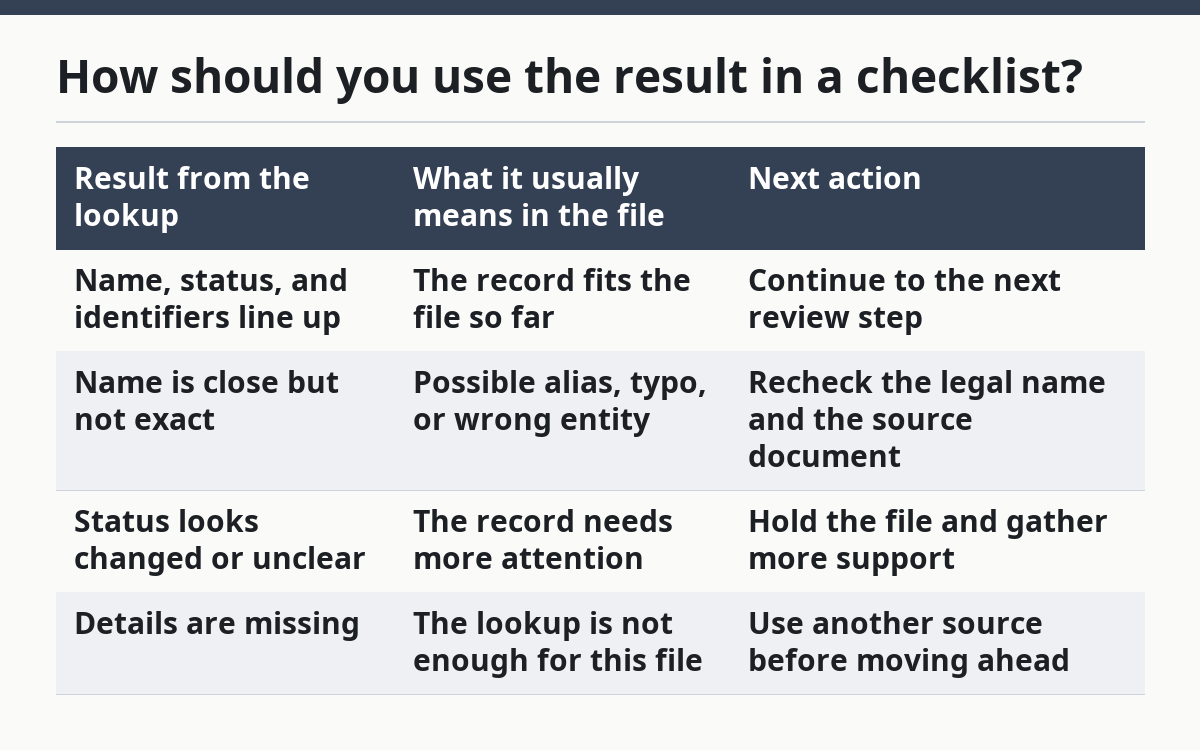
That table matters because due diligence is not one yes-or-no question. The same result can mean different things depending on the file, the counterparty, and the rest of the evidence. A clean match on a simple vendor may be enough to continue. The same match on a higher-risk file may only be the first of several checks.
A practical checklist usually has three buckets: confirmed, needs follow-up, and do not proceed yet. That keeps the team from pretending every result is equal. It also stops small misses from becoming big mistakes later.
If you are building a checklist from scratch, put the lookup near the top, right after the basic intake fields. That way the record confirms the identity before the rest of the review takes more time. For a 10-item checklist, that placement usually saves rework.
What are the common mistakes?
The common mistakes are using the wrong name, reading too much into one field, and skipping the note after a mismatch. Each one weakens due diligence in a different way.
Using a trade name instead of the legal name can point you to the wrong company record. That costs time and can lead to a false match. The fix is simple: search the exact name from the source document first, then test any alternate names only if the file supports them.
Reading too much into one status field is another trap. A status line may be useful, but it does not tell the whole story of the company. If you make a decision from one field alone, you risk missing a detail that appears in the rest of the record.
Skipping the note is a quiet error that grows over time. Without a short record of what you saw, nobody can tell whether the file was reviewed carefully or just glanced at. The fix is a 1-minute note with the date, the search term, and the result.
A third mistake is treating the lookup as a final answer when the file still has gaps. That is the wrong use of the site. If the file is incomplete, consult a qualified professional and use the source document before you treat the result as settled. It is better to stop after a partial result than to fill in the missing parts with guesses.
This is also where the page is not for people who need a formal opinion or a signed conclusion. If the decision depends on a legal, regulatory, or financial judgment, the lookup is only one input and should be treated that way; if needed, consult a professional and check the original record. For a related screening example, FINRA’s BrokerCheck shows how identity and status checks support, but do not replace, deeper review.
When should you stop and go back to the source file?
You should stop and go back to the source file when the company name, status, or identifiers do not line up cleanly. That is the point where the lookup stops being a helper and starts being a warning light.
A mismatch can come from a typo, a name change, or the wrong entity entirely. You do not need to guess which one it is on the spot. You only need to recognize that the file is not settled yet.
If the record shows a different legal name, a different status, or a date that does not match the rest of the file, pause the review. Then compare the lookup with the original application, contract, or registration document. The source file is the place to resolve the conflict, not the lookup page.
This rule is especially useful when the file is time-sensitive. A fast decision feels efficient, but a wrong one can create more work later. A 5-minute pause now is usually cheaper than a 5-day cleanup later.
For general due diligence practice, the SEC’s investor resources at Investor.gov and FINRA’s BrokerCheck show why identity and status checks matter in screening. Those tools are not the same as regulatorlookup.org, but they reflect the same basic discipline: confirm the record before you trust it.
FAQ
Is regulatorlookup.org enough on its own?
No. It is a useful screening tool, but it should not be the only source for a due diligence decision. Use it to confirm a company record, then rely on the source file and any other required checks before you decide.
What should I document?
Document the exact name searched, the date, the status shown, and any mismatch you saw. A short note with those four items is usually enough to explain why the file moved forward or stopped.
How often should I recheck a record?
Recheck a record any time the file changes, the counterparty updates its details, or the status looks old. For an active file, a repeat check after a material change is more useful than a fixed habit with no trigger.
What if the record does not match the company file?
Treat that as a follow-up item, not a passing result. Go back to the original document, check the legal name, and confirm whether you are looking at the right entity before you move ahead.
Drafted with AI; not yet reviewed by a person.
2 thoughts on “How to use regulatorlookup.org in due diligence”