How to save or share a regulatorlookup.org record
Use 1 of 3 methods — bookmark the page, copy the page link, or save both the link and the record reference in a note. If you need a fixed reference later…
How to save or share a regulatorlookup.org record
Last updated: November 15, 2026
Quick answer: use 1 of 3 methods — bookmark the page, copy the page link, or save both the link and the record reference in a note. If you need a fixed reference later, the most practical choice is usually a bookmark for personal use or a link plus record reference for sharing. This guide explains how to save or share a regulatorlookup.org record without losing the exact page.
Save the regulatorlookup.org record page link, bookmark the page, or copy the page into a file if you need a fixed reference later. A browser bookmark is often the quickest personal option; a copied link or saved note is usually better when 2 or more people need the same regulatorlookup.org record.
Key takeaways
- The quickest way to keep a regulatorlookup.org record is to save the page URL or add a bookmark in your browser.
- If someone else needs the same page, send the record page link instead of screenshots when you can.
- Shared copies work best when they include the record reference, not just a vague note like “the one we found.”
- Browser bookmarks are for one person; links and exported files are better for a team.
- If the page changes later, a copied link is still the cleanest way to return to the same record page.
What counts as saving a record page?
Saving a regulatorlookup.org record means keeping a way back to the same record page without starting over with a new search. That can be as simple as a bookmark, or as plain as copying the link into a note, email, or 1-line file name.
The key detail is the difference between the record page and the search results. A search result can shift if you change the query, but the record page is the destination you want to keep. If the page shows a record reference, keep that too, because it helps you confirm you are looking at the same entry later.
For most readers, there are 3 practical ways to save it: bookmark the page in the browser, copy the page link, or save a text note with the record reference and the link together. One simple handoff is a note with 2 lines: the link and the reference.
This page is part of the regulator lookup methods hub, where the bigger job is finding and reusing the right record without repeating the same search each time. That matters when you are checking the same entry more than once in a day, a week, or a longer review.
How do I keep a record for later?
You keep a record for later by saving the page link or adding the record page to bookmarks before you close the tab. In a browser, that usually takes under 1 minute.
A basic workflow looks like this:
- Open the record page you want to keep.
- Copy the page link from the browser bar if you want a shareable address.
- Add the page to bookmarks or favorites if you want one-click access later.
- Save the record reference in the same note or message so you can match the page to the right entry.
- Use a short label, such as the name on the record or the record reference, so the bookmark is easy to find later.
- Reopen the bookmark once to make sure it takes you back to the same record page.
That process matters because bookmarks are only useful if you can tell them apart. If you save 5 similar records, a title like “regulatorlookup.org” alone will not help much. A label with the record reference is better, and it avoids the common mistake of saving the wrong page among several tabs.
If you use a notes app, put the link on its own line and the record reference on the next line. A two-line format is easier to scan later than a long paragraph, especially on a phone. It also gives you a cleaner handoff if you need to send the record to someone else in a message thread.
For browser help, the bookmark feature in Google Chrome and Mozilla Firefox is the same idea even if the buttons look a little different. Chrome’s bookmark help is here: https://support.google.com/chrome/answer/95739 and Firefox’s bookmark help is here: https://support.mozilla.org/en-US/kb/bookmarks-firefox. Those pages show the browser side of the process, which is the part most people need.
Can I copy the page link?
Yes, you can copy the page link, and that is a practical way to point someone to the exact record page. A copied link is better than a screenshot because it stays clickable and can be reopened in seconds.
Use the browser address bar, copy the full URL, and paste it into your message, note, or file. If the page includes a record reference, keep that in the same line or the line below it, because a link alone can be hard to sort through when several records are being discussed.
There is one trade-off here. A copied link is only as useful as the page behind it, so if the browser session changes or the page is moved, the link may not behave the same way forever. That is why a record reference still matters. The reference gives you a second way to identify the entry even if the page is opened in a different browser or shared days later.
If you are sending the link to a team, add a short note with the purpose of the record. A plain “record page for review” is more helpful than a silent link, because the other person knows why they are opening it. A 1-line note can save a round trip of questions.
If the page is sensitive in your workflow, think before sending it to a wide group chat. A link shared to 12 people is harder to control than a link sent to 1 person or stored in a team file. The same rule applies to any record you plan to keep for more than a day: fewer copies usually means fewer mix-ups.
How do I share it with a team?
You share it with a team by sending the record page link together with the record reference, then storing both in one shared place. That gives everyone the same target and reduces the chance that 2 people end up using 2 different records.
A simple team handoff can look like this:
| Share method | Best for | Main drawback |
|---|---|---|
| Bookmark | One person returning to the page later | Not useful to anyone else unless they use the same browser profile |
| Link in chat or email | Fast handoff to 1 or 2 people | Easy to lose in a long thread |
| Shared note or document | Team review over several days | Needs a clear label and version control |
| Screenshot | Visual confirmation of what was on the page | Not clickable and can miss the record reference |
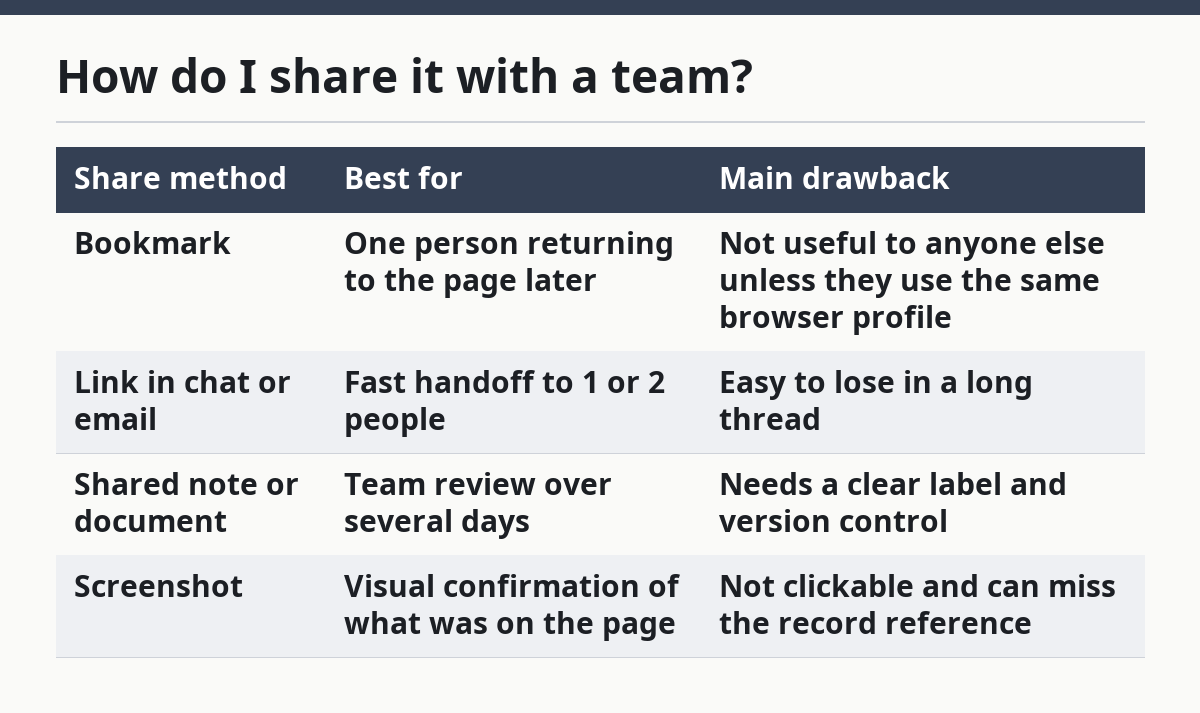
The strongest choice for a team is usually a shared note or document with 2 items: the record page link and the record reference. That gives the group a stable reference point and a backup if someone later asks, “Which record was that again?” If the record page changes, the note still tells the team what was originally shared.
A common mistake is sharing only the screenshot. A screenshot can show what the page looked like on a certain day, but it does not let the next person reopen the record page. If the team needs to check the entry again, the screenshot becomes a dead end.
Another mistake is stripping out the record reference and sending only the link. That can work once, but it gets messy when 2 or 3 records are being discussed at the same time. The reference keeps the record page tied to the exact entry you meant, which is especially useful in a group chat with short messages and fast replies.
What should I save besides the link?
You should save the record reference, the date you saved it, and any note that explains why you kept it. Those 3 details make the saved record useful later, not just stored.
A bare link is fine for a quick return visit, but it is weak as a long-term note. Add the record reference beside it, and if there is a reason you saved the page, write that reason in plain words. For example, “saved for second review” is better than a vague label like “check later.”
If you are building a file for repeated use, keep the format stable. Use the same order every time: record reference, page link, and short note. That makes the list easier to scan after 10 or more entries, and it keeps the file from turning into a pile of unlabeled URLs.
This matters most when you are comparing several regulatorlookup.org records over time. A date on the note helps you separate a page you saved today from one saved last week. Even a simple date line can prevent confusion when the same team revisits a record page after a gap of several days.
Do not rely on memory alone. A page title that looks obvious now can be hard to recognize later, especially if you have opened multiple tabs. The saved note is the backup that tells you why the record mattered in the first place.
What are the most common mistakes?
The most common mistakes are saving the wrong page, leaving off the record reference, and sharing a screenshot when a link would do the job better. Each one creates extra work later, and each one is easy to avoid with a 30-second check.
Saving the wrong page usually happens when a user copies the browser link from the search results instead of the record page. That costs time because the next person has to search again. The fix is simple: make sure the page you save is the record page itself, not the page that came before it.
Leaving off the record reference costs clarity. A link can still work, but it may not tell anyone which of several similar records they are opening. Put the reference in the same note, line, or file name so the record can be identified without guesswork.
Sharing a screenshot instead of a link costs flexibility. A screenshot freezes what you saw, but it does not let another person reopen the page or copy the address. Use screenshots only when you need a visual record of the page at that moment, not as the main way to share it.
A final mistake is using a bookmark and then forgetting where you put it. That happens more often when the bookmark name is too generic. A label with the record reference and a short description is easier to search than “saved page 1” or “lookup.”
Can I send a record to someone else?
Yes, you can send a record to someone else by sharing the record page link and the record reference together. That is a clean way to let another person open the same entry without repeating the search.
If the other person only needs a quick look, a message with the link may be enough. If they need to work with the record later, add a short note that says what the record is for and when you saved it. A 2-line message is often clearer than a full paragraph.
This is not the same as handing off a search result. A shared record page is the exact destination, while a search result can lead to several possible paths. That difference matters when a team needs the same record on the same day, not a similar one later.
If the record is likely to be discussed more than once, keep a copy in a shared document too. That gives you a stable place to find the link if the original message gets buried. A good handoff is not just “sent”; it is still findable 1 week later.
How do I save a record for later?
You save a record for later by bookmarking the page, copying the link, and keeping the record reference in the same place. That gives you 3 ways back to the same entry without starting from scratch.
The quickest method is bookmark first, then copy the link into a note. That gives you a personal shortcut and a shareable copy at the same time. If you use a phone, the note can be as simple as 2 lines: the page link and the record reference.
If you plan to send the record to a colleague, save it in a shared note instead of only in your browser. A browser bookmark is tied to one device or profile, but a shared note can be opened by the whole team. That difference is the main reason teams need a second copy of the record details.
A good saved record is easy to read in 10 seconds. If you cannot tell what it is from the label, the link, and the reference, it is not really saved well yet. Fixing that now is cheaper than trying to untangle it later.
Can I send a record to someone else?
Yes. Send the record page link, not just the title, and include the record reference in the same message. That gives the other person a direct path to the exact page and a second identifier if they need to check it again later.
How do I keep a record for later?
Save the page as a bookmark and keep a note with the record reference beside it. A 2-part saved note is easier to find than a lone link, especially if you revisit the page after several days.
Can I copy the page link?
Yes. Copy the full address from the browser bar and paste it wherever you keep notes or send messages. If possible, keep the record reference with it so the link still makes sense when it is read out of context.
Drafted with AI; not yet reviewed by a person.