How to search regulatorlookup.org by company name
How to search regulatorlookup.org by company name usually takes 1 to 5 searches. Start with one company name, then test 2 to 5 variants if the first…
How to search regulatorlookup.org by company name
Last updated: November 16, 2026
Quick answer: How to search regulatorlookup.org by company name usually takes 1 to 5 searches. Start with one company name, then test 2 to 5 variants if the first result list is unclear. In the first paragraph, this article explains How to search regulatorlookup.org by company name with the company name as the starting point and the results list as the check. The basic workflow is to type the name, review the results, and compare exact and near matches.
Key takeaways
- Start with the most exact company name you know, then trim it only if the results list is empty.
- A missing result does not always mean the company is absent; it may be listed under a legal name, a brand name, or a slightly different spelling.
- The search field is only the first step; the results list is where you confirm whether the entry is the right one.
- Short names can return several close matches, so the safest choice is usually the record that matches both name and context.
- If punctuation or old branding gets in the way, search again without the extra marks or with a former name.
How do you search regulatorlookup.org by company name?
You search regulatorlookup.org by company name by typing the name into the search field and then checking the results list for the best match. The job is simple, but the details matter: one letter, one suffix, or one old brand name can change what appears.
Use the company name you know first, not a guess at a number or regulator. This page is for name-based searching only, and that means the search field is doing the heavy lifting. If the site returns several entries, compare the spellings before you click anything. For broader lookup guidance, the hub page is the better next stop.
A good company-name search usually takes 1 minute or less once you know the wording to use. The main mistake is treating the first result as automatically correct. On a site with multiple similar names, the best match may be the second or third result in the list.
What should you type in the search field?
You should type the most exact company name you have, then remove extra words if the first search comes up empty. Start with the full legal name if you know it, because that often gives the search field the best chance of finding the right record. For company-name guidance, official name rules on Companies House and filing searches on the Companies House service are useful reference points.
Here is the simplest order to try:
- Enter the full company name exactly as it appears on documents, labels, or emails.
- Search once and review the results list for an exact match or near match.
- If there are no useful results, remove words like “Group,” “Holdings,” or “Services” one at a time.
- Try the brand name or trading name if the legal name gives too many results.
- Search again with a shorter version if the company uses a long name with 3 or more parts.
That order matters because search tools often favor close text matches over broader guesses. A 12-word company name can be harder to find than a 2-word core name. The search field works best when you feed it the part of the name that stays consistent across records. For the same reason, a short core name can be easier to test than a long legal string.
Do not add extra punctuation, quotes, or search logic unless the site clearly asks for it. A plain name is usually the cleanest input. If the results list is crowded, the next step is not to type more words at random; it is to test a shorter version of the same name.
How do you handle exact name matching?
You handle exact name matching by treating the first result as a lead, not proof. An exact match means the spelling looks right, but it still needs a quick check against the rest of the entry.
This matters because a company can appear under a legal name that is slightly different from the name on a website or invoice. “ABC Solutions Ltd” and “ABC Solutions Limited” may point to the same business in one system and two separate records in another. Even a single added word can split results.
Use exact matching in this order:
- First, compare the core company name.
- Then check suffixes such as “Ltd,” “LLC,” or “Inc” if they are present.
- Next, look for punctuation differences such as commas, periods, or ampersands.
- Finally, check whether the result includes an old or alternate business name.
A clean exact-match search saves time because it narrows the list before you start comparing records. But it is not always enough. If the site stores the company under a registered name rather than a public-facing brand, the exact match may be close but not identical. That is where name variants become useful.
What if the company uses more than one name?
You should try name variants when the first search does not return the record you expected. Many companies use more than one name in public life, and the site may index one version while you know another.
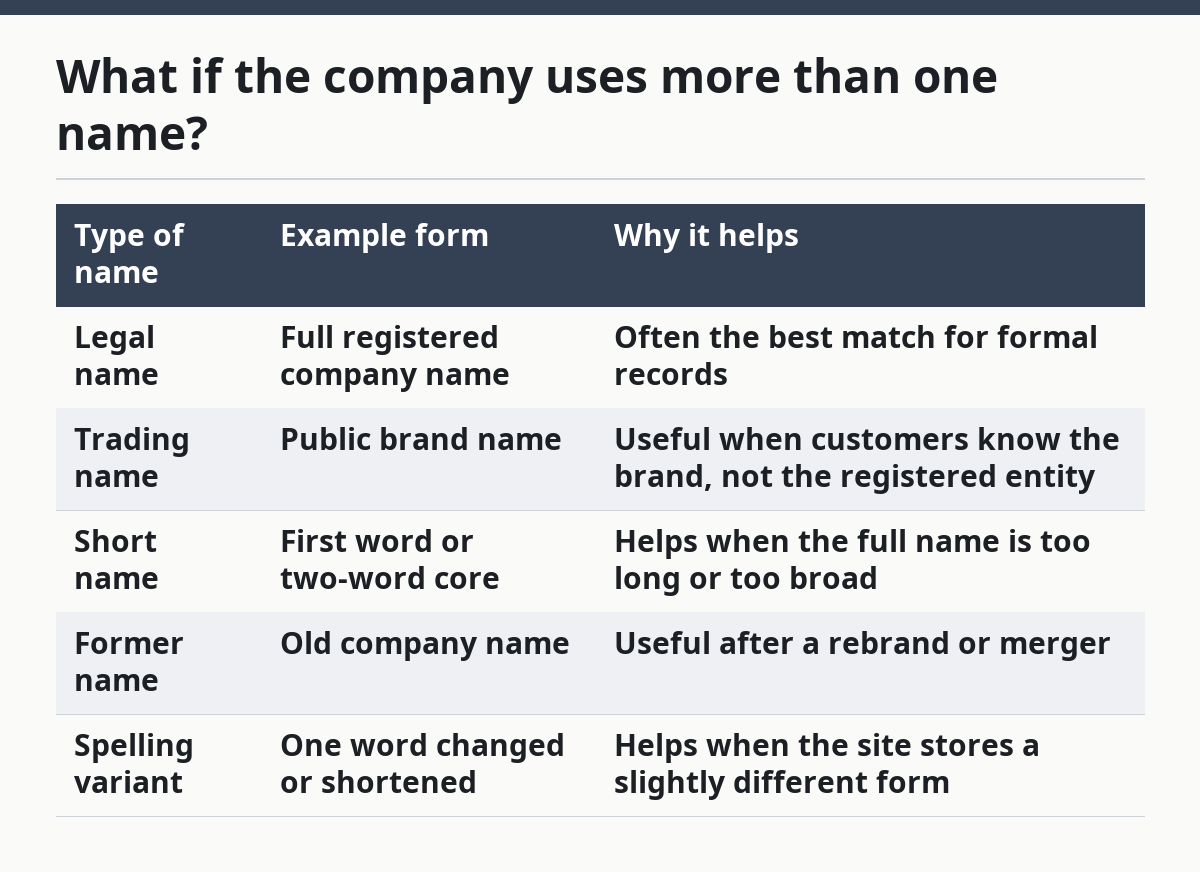
The main variants to try are these:
| Type of name | Example form | Why it helps |
|---|---|---|
| Legal name | Full registered company name | Often the best match for formal records |
| Trading name | Public brand name | Useful when customers know the brand, not the registered entity |
| Short name | First word or two-word core | Helps when the full name is too long or too broad |
| Former name | Old company name | Useful after a rebrand or merger |
| Spelling variant | One word changed or shortened | Helps when the site stores a slightly different form |
A company that rebranded 2 years ago may still be listed under its older name, especially if the record was not updated to the new brand. If the search results look wrong, ask a simple question: “What name would appear on a filing, not on the homepage?” That usually points to the right version.
The trade-off is that broader searches return more noise. A short brand name can produce a long results list, and that costs time. A longer legal name can be more precise, but it may miss the record if the site stores a shortened version. The practical fix is to test 2 or 3 versions, not 10. This Companies House search guidance shows why name variants can matter in practice.
How do you filter the results list?
You filter the results list by comparing the company name, location clues, and any other visible record details before you click. The results list is not just a pile of names; it is the place where you separate the right company from a similar one.
Use this quick filter in order:
- Look for the closest spelling match first.
- Compare the number of words in the name.
- Check for suffixes like Ltd, LLC, or Inc.
- Watch for punctuation changes, especially ampersands and periods.
- Read any visible location, regulator, or category clues attached to the entry.
This step matters most when the company name is common. A name like “Atlas,” “Prime,” or “Capital” can produce several lookalikes in the same 30-second scan. The results list should narrow the field, but it can also hide the right match behind nearly identical names.
If two entries look almost the same, do not choose based on the shortest name alone. Shorter is not always better. The correct record is the one that matches the full name pattern and any extra clue the site gives you, even if it sits lower in the results. The FCA register is another example of a public database where close name matches need a second check.
What common search errors should you avoid?
You should avoid three common search errors: using the wrong version of the name, typing too much punctuation, and reading the first result too quickly. Those mistakes can send you to the wrong record or leave you thinking the company is missing.
The first error is using a name from marketing instead of the actual filing name. A company may trade under one label and register under another. If the search field returns nothing useful, that does not mean the site failed; it may mean the name you used was the public brand, not the recorded entity.
The second error is overcomplicating the search. Extra symbols, full legal text, or a long string of words can make the results list harder to read. A short, clean search often works better than a 20-character guess. If the site does not reward punctuation, leave it out.
The third error is stopping at the first near match. That can cost you the correct record when the list contains 2 similar names. Spend another 30 seconds checking the rest of the list before you move on.
What if the search still looks wrong?
You should simplify the company name and search again if the first pass looks wrong. When the results list is empty or crowded with bad matches, the best move is to reduce the name to its core words and try a second time.
A practical reset looks like this:
- Remove punctuation.
- Drop extra business words.
- Try the trading name.
- Try the former name if the company rebranded.
- Compare the new results list against the old one.
This is the part many generic guides skip: the search field is not a one-shot test. It is a short sequence of tries, usually 2 to 5, until the name shape matches the record shape. That is normal for a directory-style lookup page. A name-based search page works best when you compare each new result list against the last one.
This page is not the right tool if you only know a regulator, a number, or a glossary term. It is built for company-name searches, and forcing a different query into it wastes time. For broader regulator lookup methods, the main regulator lookup guide is the better next stop.
How do you know you found the right company?
You know you found the right company when the name, wording, and visible record details line up closely enough that there is no reasonable doubt. The company name is the starting point, not the finish line.
Check the match against three things:
- the exact spelling of the name
- the presence or absence of a legal suffix
- any visible clue that separates similar records
If all three line up, the record is likely the one you want. If one of them is off, keep searching. A record that is “close enough” can still be the wrong business, especially when two companies share a short name.
A careful check takes under 2 minutes and saves you from using the wrong entry later. That matters because a mistaken lookup can send you to the wrong filings, the wrong history, or the wrong regulator context. A good search is not about speed alone; it is about choosing the right name from the results list.
Can I search with an old company name?
Yes, and that is often the first backup to try if the current name returns nothing useful. An older name can still point to the same company, especially after a rebrand or merger.
The trade-off is that older names can also point to records that are no longer active under the current brand. If the old name returns results, compare it with the current public name before assuming they are the same entry.
What if the company name has punctuation?
You should try the search again without the punctuation if the first attempt fails. Dots, commas, apostrophes, and ampersands can change how a search field reads the name.
If “A&B” does not work cleanly, try “AB” or “A and B” if the site appears to split symbols. Keep the name short on the second pass so the punctuation does not hide the core words. Punctuation differences can also explain why two names look alike but return different entries.
Why is my search returning no results?
Your search may return no results because the company is listed under a different name, a shorter version, or an older legal name. That is the most common reason a company-name search feels empty even when the record exists.
Try a 2-step reset: remove extra words, then search the brand name or former name. If that still fails, the issue is usually the name version, not the site itself.
Drafted with AI; not yet reviewed by a person.